 ARCHIVE
country road "behind" Mt. Diablo - Robin Kleb
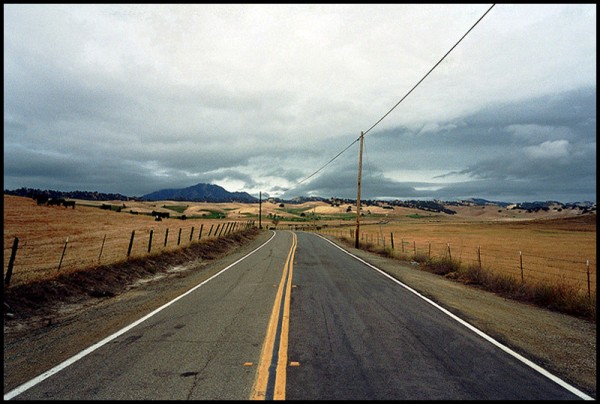
This is "behind" Mt. Diablo because it's not the side I normally see. I was somewhere near Antioch, California.
| Camera: | G1 |
| Lens: | 28mm |
| Film: | Fuji Superia 400 |
| Exposure: | |
| Flash: | |
| Support: | |
| Filter: | |
| Adjustment: | |
| Posted: | 28-May-2002 |
Rating: 8.00 (5 ratings)
Comments
R.I.P.
Alternate caption: The last know picture taken by aspiring photographer Robin Kleb, flattened by a semi on its way to deliver a cargo of rutabaga. The camera was found by the roadside by brother Sintchak (Moose Lodge, Local No. 179) and this picture has been processed and submitted in Kleb's enduring memory. ;-)
Anker Heegaard 28-May-2002 at 17:58Hee hee!
Ghostly laughter from the great beyond. Got a kick out of your comment, Anker! Actually, I could HEAR those rutabaga trucks coming. Alas, I was waiting for the perfect cloud formation and didn't move fast enough. Thank goodness for Richard -- my work lives on. :-)
Robin Kleb 28-May-2002 at 19:11Greyhound
Robin, this image reminds me of riding the Greyhound bus---as a young man--around the byways of California.
I would burn in a bit more of the skyline in the forward part of the image--or perhaps add a small black border---to keep the viewer in the frame.
Thanks Jerome,
I tried burning in the top but I just couldn't make it look natural. The border was easier! :-)
Robin Kleb 28-May-2002 at 23:42Oops! I was wrong!
Now I put it back without the border. It wasn't easy after all! Somehow I got jagged lines then. I'll have to try again tomorrow. Maybe I can practice with the burning in.
Robin Kleb 28-May-2002 at 23:48Suggestions. . .
Robin, unfortunately not all my suggestions are worth the time it takes me to peck them out and upload. :-)
Jerome Belthrop 29-May-2002 at 07:17Leaning
This image gives me the feeling that I am leaning to the left after driving very fast around a curve in the road and preparing for the curve ahead. (The left side fenceposts, foreground utility pole, and horizon are leaning a bit to the right. Is there a slight CW rotation to this image?) - Brad
Bradley Schwartz 29-May-2002 at 08:22-
Jerome, the suggestions were great -- I just haven't figured out how to do either of them yet, without making my photo look worse. :-) Brad, what does "CW rotation" mean? I know the fence on the left side really was leaning to the right, and the land was higher on that side.
Robin Kleb 29-May-2002 at 09:07CW rotation
CW = clockwise. Although this image is great, I was trying to visualize how it would appear if you rotated it slightly CCW (counter-clockwise). - Brad.
Bradley Schwartz 29-May-2002 at 10:34-
Thanks again Jerome and Brad. I did a little burning, a little border and a little bit of pulling some diagonal corners for that rotation thing.
Robin Kleb 29-May-2002 at 18:05Framed . ..
Robin IMO the frame helps your image greatly. Without the framing-- I did feel as though I my eyes were leaving the image---much too quickly. ;-)
By setting the background colour and increasing the canvas size--you added about a 3 pixel border, I assume. Were you able to do this the same way as I suggested using Elements or is the layout of the canvas size in a different place?
it worked like you said
It worked just like you described it to me Jerome. I did a five pixel border so I could just set the canvas size for 10 more for each dimension and make it easy on myself. Math isn't one of my strong points :-)
Robin Kleb 30-May-2002 at 07:13Rating Challenge
as the images keep getting better, I get stingy. I am resisting the tendency this time.
George Shadoan 30-May-2002 at 18:05very good one
I love the mood, really "on the road"!!
Daniele Esposito 22-Apr-2005 at 09:13